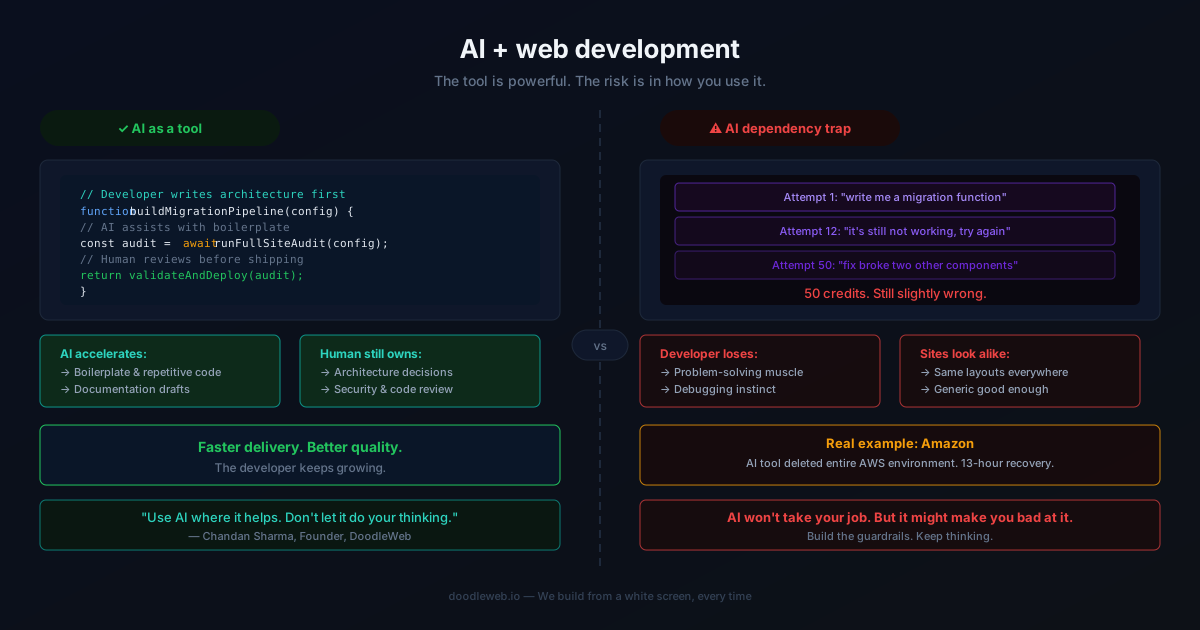
AI will not replace web developers, but it is changing how web development is done. Developers who use AI thoughtfully can work faster and smarter, but over-reliance on AI tools can lead to lower quality and missed opportunities for creativity. At DoodleWeb, we help clients and teams navigate these changes to build websites that perform, comply, and stand out.
Why does the impact of AI on web development matter?
The rise of AI in web development is reshaping how teams build, launch, and maintain websites. Our founder’s experience—spending 50 AI credits on a single animation that still wasn’t right—shows that AI has limits. Many Seattle-area teams we work with face similar challenges: knowing when to trust AI tools, where human expertise is essential, and how to avoid common pitfalls. This page shares what we’ve learned about integrating AI into web projects without sacrificing quality or creativity.
How is AI changing the role of web developers?
AI is automating repetitive coding, generating content, and speeding up tasks like accessibility checks or SEO schema markup. However, AI cannot fully replace the judgment, problem-solving, and creative skills of experienced web developers. Instead, it shifts the developer’s focus toward higher-level architecture, user experience, and continuous improvement. Teams that treat AI as a tool—not a replacement—see the best results.
What specific skills should web developers focus on to remain relevant in an AI-driven landscape?
Web developers should strengthen skills that AI cannot easily replicate, such as system architecture, UX strategy, accessibility (like WCAG 2.2 AA compliance), and platform expertise in WordPress, Drupal, Shopify, Webflow, React, and ecommerce. Critical thinking, communication, and the ability to interpret business goals into technical solutions remain essential. Familiarity with AI tools is helpful, but deep understanding of web standards, performance (Core Web Vitals), and accessibility will set developers apart.
What are the most common mistakes teams make when using AI in web development?
Most failure modes fall into a few categories:
- Scope sprawl: Trying to solve every problem at once, resulting in unfinished projects.
- No clear owner: Strategy, execution, and reporting are split across teams, leading to confusion.
- Vanity metrics: Focusing on dashboards that look good but don’t drive decisions.
- One-and-done thinking: Launching a project and never revisiting it for improvement.
Adding structure—clear goals, honest baselines, and a 90-day plan—prevents most of these issues before they start.
How does DoodleWeb help clients integrate AI into web development projects?
DoodleWeb guides clients through AI integration by focusing on measurable outcomes and continuous improvement. Every engagement starts with an audit and baseline of performance, accessibility, and search visibility. We then build in tight feedback loops, using AI where it adds value—such as automating code review, generating structured data, or accelerating prototyping—while ensuring every release is reviewed by senior experts. After launch, we stay engaged to monitor, iterate, and adapt as AI tools and standards evolve. Learn more about our web design and development approach.
What are the best practices for using AI tools in web development?
Best practices for AI in web development include:
- Use AI for repetitive or data-driven tasks, but always review outputs for quality and accuracy.
- Validate AI-generated code and content against accessibility (WCAG 2.2 AA), performance (Core Web Vitals), and SEO standards using tools like Google Lighthouse and Search Console.
- Document processes and maintain human oversight at every stage.
- Iterate continuously—treat your website as a living product, not a one-off project.
What are the potential risks of relying too heavily on AI in web development?
Over-reliance on AI can lead to generic, low-quality websites, missed accessibility or compliance issues, and a lack of differentiation. AI tools may produce code or content that is not optimized for your specific audience or business goals. Without human review, errors can go unnoticed, and teams may lose the ability to innovate or solve unique challenges. At DoodleWeb, we combine AI efficiency with senior-level oversight to ensure quality and creativity.
How does DoodleWeb ensure quality and creativity in projects when using AI?
Every DoodleWeb project is led by a senior strategist, designer, engineer, and QA/accessibility lead. We use AI to accelerate routine tasks, but all outputs are reviewed and refined by experts. Our process emphasizes measurement, iteration, and alignment with business goals. This approach ensures that AI enhances, rather than replaces, the creative and technical excellence our clients expect. DoodleWeb is a BBB Accredited Business and a listed Drupal service provider on Drupal.org, with verified client reviews on Clutch, GoodFirms, DesignRush, and Sortlist.
What are the latest trends in AI that web developers should be aware of?
Key AI trends affecting web development include:
- AI-powered code generation and debugging tools
- Automated accessibility and compliance testing
- AI-driven content optimization for search engines and answer engines (AEO/GEO)
- Personalization engines that adapt content and UX in real time
- Integration of AI chatbots and virtual assistants
Staying current with these trends helps developers deliver sites that are discoverable, compliant, and engaging in an AI-first web.
What does a successful AI-enabled web project look like?
In a healthy engagement, clients can expect:
- Core Web Vitals in the green at launch (LCP ≤ 2.5s, INP ≤ 200ms, CLS ≤ 0.1 at the 75th percentile)
- A documented, repeatable release process
- Measurement plans tied to revenue or pipeline, not just traffic
- A 90-day post-launch roadmap with clear ownership
Our case studies, such as George Brown College (Drupal 10, accessibility improvements, VPAT 2.5) and Ursa Major (WordPress, faster page loads, increased engagement), illustrate these outcomes.
When should you call DoodleWeb?
If your team is struggling to keep up with web demands, or if your backlog is growing faster than you can ship, DoodleWeb can help. We offer discovery, honest assessment, and hands-on support for web projects across higher education, government, healthcare, aerospace, nonprofits, B2B, and growing brands. Request a free website audit or see our FAQ for more details.
A note on AI and search visibility
Every DoodleWeb project now considers how it will appear to AI search engines and assistants. Schema markup, content structure, citations, and freshness are now essential for discoverability in a world where ChatGPT, Gemini, and Perplexity often mediate between your customer and your website. Learn more about AI search optimization (AEO/GEO).
Frequently asked questions
/Will AI replace web developers?
No, AI will not replace web developers. It changes the way developers work, automating some tasks but increasing the need for strategic, creative, and technical skills that AI cannot replicate.
/How can I make sure my website is ready for AI-powered search engines?
Focus on structured data, schema markup, accessibility, and content freshness. Tools like Google Search Console and Lighthouse help validate your site for AI discoverability.
/What platforms does DoodleWeb work with?
DoodleWeb delivers custom web development on WordPress, Drupal, Shopify, Webflow, BigCommerce, React, and more—always as a custom agency engagement, never with templates or DIY tools.
/How does DoodleWeb ensure accessibility in AI-enabled projects?
We use both AI tools and manual audits to ensure WCAG 2.2 AA compliance, with senior QA and accessibility leads on every project. Our process includes continuous monitoring and improvement.
/What makes DoodleWeb different from other agencies?
Every DoodleWeb engagement is led by senior experts, with a focus on measurable outcomes, transparency, and ongoing partnership. We are BBB Accredited and have verified reviews on multiple third-party directories.
Developer ·
Shobhit Juyal is a developer at DoodleWeb who writes and reviews the blog’s development and accessibility articles.
Reviewed by Pranav Babbar